dimanche 2 décembre 2012

Java Basic Syntax (L2)


When we consider a Java program it can be defined as a collection of objects that communicate via invoking each others methods. Let us now briefly look into what do class, object, methods and instant variables mean.
  • Object - Objects have states and behaviors. Example: A dog has states-color, name, breed as well as behaviors -wagging, barking, eating. An object is an instance of a class.
  • Class - A class can be defined as a template/ blue print that describe the behaviors/states that object of its type support.
  • Methods - A method is basically a behavior. A class can contain many methods. It is in methods where the logics are written, data is manipulated and all the actions are executed.
  • Instant Variables - Each object has its unique set of instant variables. An object's state is created by the values assigned to these instant variables.

First Java Program:

Let us look at a simple code that would print the words Hello World.
public class MyFirstJavaProgram{

   /* This is my first java program.  
    * This will print 'Hello World' as the output
    */

    public static void main(String []args){
       System.out.println("Hello World"); // prints Hello World
    }
} 
Lets look at how to save the file, compile and run the program. Please follow the steps given below:
  1. Open notepad and add the code as above.
  2. Save the file as : MyFirstJavaProgram.java.
  3. Open a command prompt window and go o the directory where you saved the class. Assume its C:\.
  4. Type ' javac MyFirstJavaProgram.java ' and press enter to compile your code. If there are no errors in your code the command prompt will take you to the next line.( Assumption : The path variable is set).
  5. Now type ' java MyFirstJavaProgram ' to run your program.
  6. You will be able to see ' Hello World ' printed on the window.
C : > javac MyFirstJavaProgram.java
C : > java MyFirstJavaProgram 
Hello World

Basic Syntax:

About Java programs, it is very important to keep in mind the following points.
  • Case Sensitivity - Java is case sensitive which means identifier Hello and hello would have different meaning in Java.
  • Class Names - For all class names the first letter should be in Upper Case.

    If several words are used to form a name of the class each inner words first letter should be in Upper Case.

    Example class MyFirstJavaClass
  • Method Names - All method names should start with a Lower Case letter.

    If several words are used to form the name of the method, then each inner word's first letter should be in Upper Case.

    Example public void myMethodName()
  • Program File Name - Name of the program file should exactly match the class name.

    When saving the file you should save it using the class name (Remember java is case sensitive) and append '.java' to the end of the name. (if the file name and the class name do not match your program will not compile).

    Example : Assume 'MyFirstJavaProgram' is the class name. Then the file should be saved as 'MyFirstJavaProgram.java'
  • public static void main(String args[]) - java program processing starts from the main() method which is a mandatory part of every java program..

Java Identifiers:

All java components require names. Names used for classes, variables and methods are called identifiers.
In java there are several points to remember about identifiers. They are as follows:
  • All identifiers should begin with a letter (A to Z or a to z ), currency character ($) or an underscore (-).
  • After the first character identifiers can have any combination of characters.
  • A key word cannot be used as an identifier.
  • Most importantly identifiers are case sensitive.
  • Examples of legal identifiers:age, $salary, _value, __1_value
  • Examples of illegal identifiers : 123abc, -salary

Java Modifiers:

Like other languages it is possible to modify classes, methods etc by using modifiers. There are two categories of modifiers.
  • Access Modifiers : defualt, public , protected, private
  • Non-access Modifiers : final, abstract, strictfp
We will be looking into more details about modifiers in the next section.

Java Variables:

We would see following type of variables in Java:
  • Local Variables
  • Class Variables (Static Variables)
  • Instance Variables (Non static variables)

Java Arrays:

Arrays are objects that store multiple variables of the same type. However an Array itself is an object on the heap. We will look into how to declare, construct and initialize in the upcoming chapters.

Java Enums:

Enums were introduced in java 5.0. Enums restrict a variable to have one of only a few predefined values. The values in this enumerated list are called enums.
With the use of enums it is possible to reduce the number of bugs in your code.
For example if we consider an application for a fresh juice shop it would be possible to restrict the glass size to small, medium and Large. This would make sure that it would not allow anyone to order any size other than the small, medium or large.

Example:

class  FreshJuice{
   enum FreshJuiceSize{ SMALL, MEDUIM, LARGE }
   FreshJuiceSize size;
}

public class FreshJuiceTest{
   public static void main(String args[]){
      FreshJuice juice = new FreshJuice();
      juice.size = FreshJuice. FreshJuiceSize.MEDUIM ;
   }
}
Note: enums can be declared as their own or inside a class. Methods, variables, constructors can be defined inside enums as well.

Java Keywords:

The following list shows the reserved words in Java. These reserved words may not be used as constant or variable or any other identifier names.
abstractassertbooleanbreak
bytecasecatchchar
classconstcontinuedefault
dodoubleelseenum
extendsfinalfinallyfloat
forgotoifimplements
importinstanceofintinterface
longnativenewpackage
privateprotectedpublicreturn
shortstaticstrictfpsuper
switchsynchronizedthisthrow
throwstransienttryvoid
volatilewhile

Comments in Java

Java supports single line and multi-line comments very similar to c and c++. All characters available inside any comment are ignored by Java compiler.
public class MyFirstJavaProgram{

   /* This is my first java program.
    * This will print 'Hello World' as the output
    * This is an example of multi-line comments.
    */

    public static void main(String []args){
       // This is an example of single line comment
       /* This is also an example of single line comment. */
       System.out.println("Hello World"); 
    }
} 

Using Blank Lines:

A line containing only whitespace, possibly with a comment, is known as a blank line, and Java totally ignores it.

Inheritance:

In java classes can be derived from classes. Basically if you need to create a new class and here is already a class that has some of the code you require, then it is possible to derive your new class from the already existing code.
This concept allows you to reuse the fields and methods of the existing class with out having to rewrite the code in a new class. In this scenario the existing class is called the super class and the derived class is called the subclass.

Interfaces:

In Java language an interface can be defined as a contract between objects on how to communicate with each other. Interfaces play a vital role when it comes to the concept of inheritance.
An interface defines the methods, a deriving class(subclass) should use. But the implementation of the methods is totally up to the subclass.

What is Next ?

The next section explains about Objects and classes in Java programming. At the end of the session you will be able to get a clear picture as to what are objects and what are classes in java.
Share:

Java Environment Setup (L1)


Before we proceed further it is important that we set up the java environment correctly. This section guides you on how to download and set up Java on your machine. Please follow the following steps to set up the environment.
Java SE is freely available from the link Download Java. So you download a version based on your operating system.
Follow the instructions to download java and run the .exe to install Java on your machine. Once you installed Java on your machine, you would need to set environment variables to point to correct installation directories:

Setting up the path for windows 2000/XP:

Assuming you have installed Java in c:\Program Files\java\jdk directory:
  • Right-click on 'My Computer' and select 'Properties'.
  • Click on the 'Environment variables' button under the 'Advanced' tab.
  • Now alter the 'Path' variable so that it also contains the path to the Java executable. Example, if the path is currently set to 'C:\WINDOWS\SYSTEM32', then change your path to read 'C:\WINDOWS\SYSTEM32;c:\Program Files\java\jdk\bin'.

Setting up the path for windows 95/98/ME:

Assuming you have installed Java in c:\Program Files\java\jdk directory:
  • Edit the 'C:\autoexec.bat' file and add the following line at the end:
    'SET PATH=%PATH%;C:\Program Files\java\jdk\bin'

Setting up the path for Linux, UNIX, Solaris, FreeBSD:

Environment variable PATH should be set to point to where the java binaries have been installed. Refer to your shell documentation if you have trouble doing this.
Example, if you use bash as your shell, then you would add the following line to the end of your '.bashrc: export PATH=/path/to/java:$PATH'

Popular Java Editors:

To write your java programs you will need a text editor. There are even more sophisticated IDE available in the market. But for now, you can consider one of the following:
  • Notepad : On Windows machine you can use any simple text editor like Notepad (Recommended for this tutorial), TextPad.
  • Netbeans :is a Java IDE that is open source and free which can be downloaded fromhttp://www.netbeans.org/index.html.
  • Eclipse : is also a java IDE developed by the eclipse open source community and can be downloaded from http://www.eclipse.org/.

What is Next ?

Next chapter will teach you how to write and run your first java program and some of the important basic syntaxes in java needed for developing applications.

Share:

mardi 13 novembre 2012

شرح البحث المتقدم في Google


‏‫بمجرد أن تُصبح ملمًا بأساسيات البحث في Google، قد ترغب في تجربة ميزة البحث المتقدم التي توفر خيارات كثيرة لجعل عمليات البحث أكثر دقة، والحصول على نتائج أكثر نفعًا.‬
يمكنك الوصول إلى هذه الصفحة بالنقر فوق الرابط بحث متقدم" (دون اندهاش) في صفحة Google الرئيسية.
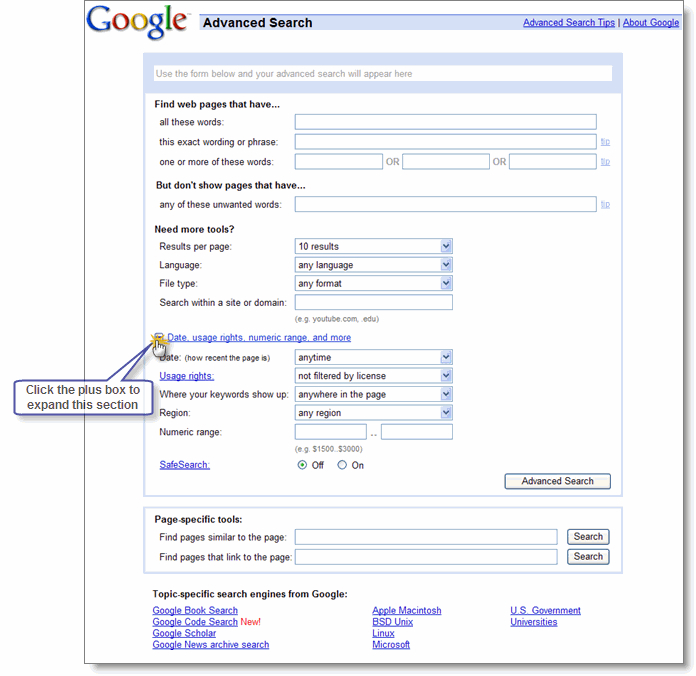
وفيما يلي نوضح شكل صفحة البحث المتقدم:
البحث المتقدمباستخدام بحث Google، يمكنك أن تفعل ما هو أكثر من مجرد إدخال مصطلحات البحث. ومع البحث المتقدم، لا يمكنك البحث إلا عن الصفحات التي:‬
  • تحتوي على كافة مصطلحات البحث التي تكتبها
  • تحتوي على العبارة نفسها التي تكتبها‬
  • تحتوي على كلمة واحدة على الأقل من الكلمات التي تكتبها
  • لا تحتوي على أي من الكلمات التي تكتبها
  • تكون مكتوبة بلغة معينة
  • تم إنشاؤها بتنسيق ملفات معين
  • تم تحديثها خلال فترة زمنية محددة
  • تحتوي على أرقام في نطاق معين
  • توجد في نطاق معين أو موقع ويب محدد
  • لا تحتوي على مادة "إباحية"

"مُعامِلات" البحث المتقدم

يمكنك أيضًا تحسين عمليات البحث التي تجريها بإضافة "مُعامِلات" إلى مصطلحات البحث في مربع بحث Google، أو تحديدها من صفحة البحث المتقدم.
تشمل مُعامِلات البحث المتقدم ما يلي:
  • البحث بالتضمين
  • البحث بالمرادفات
  • البحث بالمُعامِل OR
  • البحث بالنطاق
  • البحث بنطاق الأرقام
  • ميزات أخرى للبحث المتقدم

البحث بالمُعامِل "+"

تتجاهل Google الكلمات والرموز الشائعة مثل أين، الـ، كيف، وغيرها من الأرقام والأحرف التي تؤدي إلى خفض سرعة البحث دون تحسين النتائج. ‏‫وسنوضح ما إذا كان قد تم استبعاد إحدى الكلمات، وذلك عن طريق عرض تفاصيل في صفحة النتائج أسفل مربع البحث.‬
إذا كانت إحدى الكلمات الشائعة ضرورية للحصول على النتائج التي تريدها، فبإمكانك تضمينها بوضع علامة "+" أمامها. (تأكد من ترك مسافة قبل علامة "+").
على سبيل المثال، فيما يلي كيفية التأكد من أن Google تقوم بتضمين الرقم "I" في إحدى عمليات البحث عن فيلم Star Wars, Episode I:

البحث بالمرادفات

إذا كنت لا تكتفي بالبحث عن المصطلح المطلوب فقط، وترغب أيضًا في البحث عن مرادفاته، فضع علامة التلدة ("~") أمام المصطلح المطلوب مباشرةً.
على سبيل المثال، فيما يلي كيفية البحث عن حقائق حول الطعام والتغذية ومعلومات عن الطبخ:

البحث بالمُعامِل "OR"

‏‫للعثور على صفحات تتضمن أحد مصطلحي بحث، أضف المُعامِل OR بين المصطلحين مكتوبًا بأحرف كبيرة.‬
على سبيل المثال، فيما يلي كيفية البحث عن عطلة في لندن أو باريس:

البحث بالنطاق

يمكنك استخدام Google للبحث فقط داخل موقع ويب محدد بإدخال المصطلحات التي تبحث عنها، متبوعةً بكلمة "site" وعلامة النقطتين (:) متبوعةً باسم النطاق.
على سبيل المثال، فيما يلي كيفية إيجاد معلومات القبول بجامعة ستانفورد على موقع الويب الخاص بالجامعة:

البحث بنطاق الأرقام

هل تفضل إجراء البحث من خلال أحد الأرقام؟ ‏‫تقدم عمليات البحث في نطاق الأرقام نتائج تحتوي على أرقام في نطاق معين. ‬ وما عليك سوى إضافة رقمين إلى مربع البحث مصحوبين بمصطلحات البحث التي تريدها، على أن يكون الرقمان مفصولين بنقطتين دون مسافات. يمكنك استخدام نطاق الأرقام لتعيين نطاقات لكل شيء من تواريخ ( أم كلثوم 1960..1970) إلى أوزان ( شاحنة 5000..10000 كجم). ولكن تأكد من تحديد وحدة قياس أو مؤشر آخر لما يمثله نطاق الأرقام.
على سبيل المثال، فيما يلي كيفية البحث عن مشغِّل أقراص DVD تتراوح تكلفته ما بين 50 و100 دولار أمريكي:

ميزات أخرى للبحث المتقدم

  • Google Local: اعثر على منتجات وخدمات في مدينة محددة أو باستخدام رمز منطقة محدد في مصر.
  • اللغة: حدد اللغة التي تريد رؤية نتائجك بها.
  • بحث التقنية: اعثر على معلومات حول Apple Macintosh، أو BSD Unix، أو Linux أو Microsoft.
  • التاريخ: قم بحصر نتائجك في آخر ثلاثة أو ستة أو إثنى عشر شهرًا.
  • مواضع الظهور: حدد موضع ظهور مصطلحات البحث الخاصة بك في الصفحة، سواء في أي مكان بالصفحة، أو في عنوان الصفحة، أو في عنوان url.
  • النطاقات: ابحث في موقع ويب محدد فقط، أو استبعد ذلك الموقع من مجال بحثك.
  • البحث الآمن: إزالة المواقع الإباحية من نتائج البحث. 
Share:

jeudi 8 novembre 2012

كيفية قرصنة المواقع بواسطة Havij Pro

بسم الله الرحمان الرحيم 
 سُبْحَانَكَ لاَ عِلْمَ لَنَا إِلاَّ مَا عَلَّمْتَنَا إِنَّكَ أَنتَ الْعَلِيمُ الْحَكِيمُ

 في هذا الدرس  لا نطيل فيه نترككم مع الفيديو فيه شرح مبسط


لجميع إستفسارتكم زورزنا على صفحتنا في الفايس بوك
https://www.facebook.com/Astuces.informatiques


Share:

mercredi 7 novembre 2012

كيف تحمي Usb Flash من الفيروسات


بسم الله الرحمان الرحيم 
 سُبْحَانَكَ لاَ عِلْمَ لَنَا إِلاَّ مَا عَلَّمْتَنَا إِنَّكَ أَنتَ الْعَلِيمُ الْحَكِيمُ

فلاش ميموري  هي من أكثر الوسائل المفضلة لنشر  الفيروسات لكونها سهل نقلها من عدة أجهزة 
كما انه من السهل على أي شخص(هاكرز ) او برنامج ضار موضوع في الفلاش من وضع فيروس او دودة في الحاسوب      المستهدف حيث تقوم الدودة بصنع ملف علة الفلاش و بمجرد إتصال الفلاش المصاب بحاسوبك يقوم  الملف المصاب بالعمل لقائيا  من طرف الويندوز  .  لحماية نفسك هناك العديد من الطرق لعل أهمها هو أن لا تقوم بوضع أي فلاش في حاسوبك و ان يكون مضاد فيروساتك محيين .. و لكن هذا ليس بالكافي يمكنك الإستعانة بعدة برامج   لتقوم بتلقيح فلاشك و قرصك الصلب الخارجي  ضد هذا النوع من الهجوم حيث يقوم بمنع الفيروس من الإنتشار أتومتكيا من الفلاش عند ربطه بالحاسوب . و لحماية نفسك من الفيروسات التي يمكن العثور عليها على فلاشات غيرك و اللتي في عادة ما تكون غير مطعمة ضد تلك النوعية من الفيروسات سوف تحتاج إلى تعطيل التشغيل التلقائي في الويندوز و بالتالي اي نظام يعمل تلقائيا لم يعد له اي تأثير في حاسوبك و كذلك البرامج المتصلة به  سيقوم بمنعها
سنقوم بشرح أحد اهم البرامج لحماية الفلاش و الأقراص الصلبة   من  تلك الطريقة لنشر الفيروسات
USB SET

 رابط تحميل البرنامج  إظغط هنا 

بعد التحميل قم بتثبيته و تشغيله و إتبع الطرق التالية للحماية


  1. شغل البرنامج 

 إذهب إلى  Vaccination 2

إظغط على  Vacciner tous les lecteurs

لكل قرث صلب و فلاش قم بتأكيد العملية OK

جميع فلاشاتك و أقراصك الصلبة تم تطعيمخا و حمايتها 


-
Share:

samedi 8 septembre 2012

What is ClixSense?


Clixsense in its very own basic definition is one of the longest-running, most authentic, and most reliable Paid-to-Click (PTC Advertising) websites online. 


we will pay 


JUST CLICK ME NOW


Clixsense has been founded last February 2007, and currently, they have already paid over $2,146,478.42 to their 1,961,847 members on time every time!On the other hand, they also have delivered over  422,378,967 views to their advertisers' websites!


 My Current Clixsense Earnings and Downline Size
downline size 2 


Here's my most recent earnings and downline size with Clixsense. I am showing you this because I want to inspire everyone to pursue their ClixSense career. Currently, I have earned $1,656 and have a total of 3,310 downlines already! If you believe in what you are doing. You can also do the same. Do not settle for mediocrity. ClixSense is for achievers, and for those who wish to get rich by generating income online, the right way.

ClixSense is not a get-rich-instantly business. You need to focus on what you are doing and you should not give up. If you invited one person and they said “NO,” you should not stop nor pause for a while. 
You should continue to do what you are doing. You must think that it’s their loss! Not yours…  If you give up very easily, you will not achieve success. The word success is always integrated with the word failure, so if you fail, think about this, “It is not yet the end of everything, if you act now, who knows, you might shift your destiny to fail and become successful.


What is Paid-To-Click (PTC) for Advertisers?

Paid-To-Click Advertising is one of the cheapest way for Advertisers to promote their products or services online. It is also used by website/blogger owners to increase the number of visitors or increase the traffic of their website so that search engines can easily find their website or blog, and in return, they will be able to sell more of their products ore services.

What is Paid-To-Click (PTC) for Customers?

On the other hand, as a customer of a Paid-To-Click Advertising website, you earn by viewing the advertisements shown by the promoters. You can earn $0.001 to as high as $2.00! per advertisement that you view, depending on the length of time that you need to wait before you are allowed  to close the ads. The longer the time required to view the ad, the bigger amount of money you get, and vice versa.

Do Not Get Scammed!

scam alert
There are thousands of Paid-To-Click Advertising websites but not all of them are legitimate, a lot, yes a lot! of PTCs are just useless scams, and if you are not keen enough investigate, you may be wasting a lot of your time, money and energy for nothing!

TOP 10 REASONS  WHY YOU SHOULD JOIN CLIXSENSE?

There has been a lot of PTC or Paid-To-Click Websites out there, but for all website review, critics and evaluation, Clixsense has always been the top of them all. Do you want to know the main reasons why Clixsense has been considered the best PTC? It is because:

no limit1. Clixsense does not set any limitations to the number of advertisement you can click everyday.

2. Clixsense does not set any limitations to the number of direct downlines you may have.They do not care if you can invite thousands of direct referrals. The more you invite, the happier they are.

3 Clixsense does not set any limitations to the number of indirect downlines you may have.Yes, same goes through with the indirect referrals, your direct referrals can have as many indirect referrals until they get satisfied with their income.

4. Clixsense is the most trusted business provider since February 2007. They have received tons of compliments, and a little or no undesirable reports or complaints at all.

5.Clixsense benefits the advertisers because they have one of the lowest advertising rates in the marketplace

6. Clixsense has the cheapest Upgrade Fee in the entire community of elite  Paid-To-Click advertising companies. This is the reason why a lot of members prefer to Upgrade their Clixsense Account rather than keep it standard.

7.  Clixsense one of the lowest cash-out ever! For some Paid-To-Click websites, you need to year for years! yeah, no exaggeration, you need to wait for a very long time before you can cash out your earnings.

8. Clixsense does not have a maximum cash-out amount. If you can really earn that much, they will pay for it!

 9. Clixsense has never been late to any payment due. If they say they will pay you, then they will! They deliver on time every time.

10. Clixsense do no tolerate cheaters. Clixsense web developers have formulated a very sophisticated software technology to detect automated bot clickers. This guarantees that every visit from Advertisers' pages are from real human beings.

Why is there a need for me to tell you this? It is because there are thousands of Paid to Click and Bux sites emerging online every single day and you basically have to clue to who you are dealing with, and also what their intentions are. On contrary, which Clixsense, you know who they are and you can absolutely trust them. All they want is make this work mutually, they earn and we become successful online as well.

Share:

شرح الشركة العملاقة clixsense كيفية التسجيل وتفعيل والربح خطوة بخطوة بالصور

basmalla
شركة clixsense الرجاء الانتظار قليلا حتي تحمل الصور


صادقة + حد ادنى 10$ + شرح التسجيل بالصور

مميزات الشركه:
هي الشركة الشهيرة في مجال الشركات الربحية والمعروفة عالميا وهي من شركات الإشهار عن طريق الضغط علي الاعلانات او paid to click وسعر الضغطة 1 سنت
والمفاجاة ان علي كل ريفيرال او كل شخص يسجل تحتك هتاخد 10 سنت عمولة غير نسبتك من شغلهم هي 10% من قيمة كل اعلان
وغير ان لو احد الريفيرالات تقدم بعضويته او اصبح premium member هتزيد عمولتك وتصبح 2$
اما عن طريقة العمل بها فهي سهلة جدا وهي ان بمجرد ما تدخل حسابك ان تضغط علي "Browse Ads" هتفتح صفحة بها عدد من الاعلانات وانت ما عليك الا الضغط علي هذه الاعلانات يوميا

أشتراكى فى الشركة
الشركة اشتركت فيها فى الاسكريبت القديم وكانت ممتازة جدا بس زى اللى جربوها كانت فترات قليلة اما تلاقى إعلانات عشان تضغطها بس مع التحديث الجديد لاسكريبت الشركة الحمد لله متوسط الإعلاناتات فى اليوم مش بتقل عن 10 إعلانات دة للعضوية العادية"الأن شرح الشركة الشركة ومميزاتها بالنسبة للعضوية 


للتسجيل فى الشركة اضغط هنا واتبع الشرح بالصور

http://www.clixsense.com/?4348056
 http://www.clixsense.com/?4289611
 
شكل الصفحة الرئيسية نضغط على Sign up للتسجيل


من الصورة نرى مقدار الثقة فى الشركة
عدد الأعضاء قارب على المليون ونصف ( تخيل عدد الإعلاناتات التى يتم نزولها وعرضها يوميا)

الشركة تعمل من 2007 (4 سنيين)


بعد الضغط على Sign up سيتم نقلك لصفحة ملئ البيانات ( كتابة بيانات صحيحة)


عدها ستصلك رسالة على الإيميل بها كل بيانات حسابك التى ادخلتها
لتسجيل الدخول للموقع


تسجيل الدخول


بعد تسجيل الدخول تجد الصفحة الخاصة بك فى الشركة بها كل البيانات والمعلومات الخاصة بحسابك


الاعلانات


لشطر الاروع في الموضوع
هي لعبة ما تحتاجه ضربة حظ و توفيق من الله ان شاء ربحت5$ من نقرك على الخانة الرابحةلديك 25 محاولة يوميا


الرابط الدعائي 'الريفيرال'


طرق الدفع و ايام الدفع كل يوم اثنين


بعد ان انتهينا من شرح التعامل مع الشركة ناتى لأهم ما يميز الشركة بالنسبة للعضويات
يوجد بالشركة نظاميين (عضوية عادية – عضوية مدفوعة)

1- العضوية العادية
1- ضمان الضغط على إعلان يوميا (بعد النظام الجديد تجد اعلانات كثيرة بشكل يومى)
2- تحصل من .001 حتى .02 من الضغط على الإعلانات
3- تحصل من .001 حتى .02 من ضغطة الريفيرال
4- إذا تحول أى عضو سجل من خلالك لعضو مدفوع تحصل على 2$ دولار عمولة
5- تحصل على عمولة إذا قام الشخص الذى سجل من خلالك بعمل حملة إعلانية من 10% حتى 1$ دولار بحد أقصى 50 دولار
6- 25 ضغطة فى لعبة ClixGrid تصل الضغطة ل 5 دولار للضغطة على المكان الصحيح

2- العضوية المدفوعة
التسجيل للعضوية المدفوع قيمته 14.95 $ دولار للسنة كاملة فقط ( أربعة عشر دولار فقط )
1- ضمان الضغط على 4 إعلانات يوميا
2- تحصل من .001 حتى .02 من الضغط على الإعلانات
3- تحصل من .001 حتى .02 من ضغطة الريفيرال
4- تحصل على 20 سنت لأى ريفيرال بعد اتمامه الضغط على 20 إعلان
5- إذا تحول أى عضو سجل من خلالك لعضو مدفوع تحصل على 2$ دولار عمولة
6- تحصل على عمولة 1$ على أى عضو يسجل من خلال الذين سجلوا من خلالك حتى المستوى الثامن (Cool
(إذا قمت بدعوة صديق وقام صديقك بدعوة صديق له وقام بدعوة صديق أخر تحصل على الذى سجل من خلال الرابط الخاص بك مباشرة 2$ والذين سجلوا من خلالة حتى الفرد الثامن (Cool 1$ على كل منهم " نظام الشجرة " )
7- تحصل على عمولة إذا قام الشخص الذى سجل من خلالك بعمل حملة إعلانية من 10% حتى 2$ دولار بحد أقصى 100$ دولار
8- اعلانات كثيرة بقيمة 2 سنت و 1 سنت تضاف يوميا للعضوية المدفوعة
9- أكثر الإعلانات ذات السعر الأعلى يخصصها أصحابها للعضويات المدفوعة
10- مائة (100) إعلان يضافوا لرصيدك للضغط عليهم فى أى وقت كهدية من الموقع بقيمة 0.1 0.2 سنت للإعلان
( أى تسترد من دولار لدولار ونصف مما دفعت فى أول يوم )
11- 50 ضغطة فى لعبة ClixGrid تصل الضغطة ل 5 دولار للضغطة على المكان الصحيح


الحد الأدنى للسحب من الشركة


الدفع كل أسبوع يوم الاتنيين
Paypal 25$ عمولة 2%


الدفع كل أسبوع يوم الاتنيين
AlertPay 10$ عمولة 2.5%

شيك الحد الادنى 100 دولار وعمولة 2 دولار لأى مكان فى العالم
والبنك الألكترونى لا يأخذ منك عمولة أخرى أو رسم تحويل
لا تقلق من الحد الأدنى فالشركة موثوقة وأعلاناتها كثيرة وستصل للحد الأدنى فى فترة قصيرة

أثبات دفع
أثبات دفع clixsense من الالرت باى


Share:

Contributeurs

Membres

free counters